
Introduction
In a previous blogposts Install Raspberry Pi OS on the Raspberry Compute Module 4 I wrote about the installation of Raspbian on Raspberry Compute Module and setup cross compilation for QtCreator on Ubuntu 20.
This blogpost is an update to the - at this time - newest version 6.10 of Qt, RaspiOS Trixie and Ubuntu 24.04 LTS.
In this case, I used a virtual machine, created with UTM on a MacBook Pro M1.
Requirements
- Raspberry Pi Compute Module 5
- MacBook Pro M1 with UTM installed
- Ubuntu 24.0.4 LTS, arm64
- Qt version 6.10.1
- QtCreator 18
The installation and setup of the Compute Module 5 and of Ubuntu in the UTM is not content of this blogpost, as there are many tuturials findable in the internet.
Setup Raspberry CM5
- Flash image to eMMC with Raspberry Pi Imager
- Follow the installation and don't forget the setting for remote connect (ssh)
- Connect to the RPi with ssh -> in my case to IP address 192.168.2.194 and user pi -> from your Ubuntu host
ssh [email protected]- Install needed software:
sudo apt-get install libboost-all-dev libudev-dev libinput-dev libts-dev libmtdev-dev libjpeg-dev libfontconfig1-dev libssl-dev libdbus-1-dev libglib2.0-dev libxkbcommon-dev libegl1-mesa-dev libgbm-dev libgles2-mesa-dev mesa-common-dev libasound2-dev libpulse-dev libgstreamer1.0-dev libgstreamer-plugins-base1.0-dev gstreamer1.0-alsa libvpx-dev libsrtp2-dev libsnappy-dev libnss3-dev "^libxcb.*" flex bison libxslt-dev ruby gperf libbz2-dev libcups2-dev libatkmm-1.6-dev libxi6 libxcomposite1 libfreetype6-dev libicu-dev libsqlite3-dev libxslt1-devsudo apt-get install libavcodec-dev libavformat-dev libswscale-dev libx11-dev freetds-dev libsqlite3-dev libpq-dev libiodbc2-dev firebird-dev libxext-dev libxcb1 libxcb1-dev libx11-xcb1 libx11-xcb-dev libxcb-keysyms1 libxcb-keysyms1-dev libxcb-image0 libxcb-image0-dev libxcb-shm0 libxcb-shm0-dev libxcb-icccm4 libxcb-icccm4-dev libxcb-sync1 libxcb-sync-dev libxcb-render-util0 libxcb-render-util0-dev libxcb-xfixes0-dev libxrender-dev libxcb-shape0-dev libxcb-randr0-dev libxcb-glx0-dev libxi-dev libdrm-dev libxcb-xinerama0 libxcb-xinerama0-dev libatspi2.0-dev libxcursor-dev libxcomposite-dev libxdamage-dev libxss-dev libxtst-dev libpci-dev libcap-dev libxrandr-dev libdirectfb-dev libaudio-dev libxkbcommon-x11-dev gdbserver- Make a folder for Qt 6 installation:
sudo mkdir /usr/local/qt6- Append following piece of code to the end of ~/.bashrc and update changes:
export LD_LIBRARY_PATH=$LD_LIBRARY_PATH:/usr/local/qt6/lib/
source ~/.bashrc
Setup Ubuntu 24.04 LTS
- Update to the latest versions of the software packages:
sudo apt update
sudo apt upgrade- Install the following packages:
sudo apt-get install make cmake build-essential libclang-dev clang ninja-build gcc git bison python3 gperf pkg-config libfontconfig1-dev libfreetype6-dev libx11-dev libx11-xcb-dev libxext-dev libxfixes-dev libxi-dev libxrender-dev libxcb1-dev libxcb-glx0-dev libxcb-keysyms1-dev libxcb-image0-dev libxcb-shm0-dev libxcb-icccm4-dev libxcb-sync-dev libxcb-xfixes0-dev libxcb-shape0-dev libxcb-randr0-dev libxcb-render-util0-dev libxcb-util-dev libxcb-xinerama0-dev libxcb-xkb-dev libxkbcommon-dev libxkbcommon-x11-dev libatspi2.0-dev libgl1-mesa-dev libglu1-mesa-dev freeglut3-dev python3-html5lib libxcb-dri3-dev libxkbfile-dev libxshmfence-dev libxrandr-dev libxcursor-dev libxcomposite-dev libdrm-dev libwayland-devBuilding Qt6
There are two possibilities to build Qt6. There is a "single" (https://download.qt.io/official_releases/qt/6.10/6.10.1/single/qt-everywhere-src-6.10.1.tar.xz) version to download, which contains qtbase and all submodules. This is very heavy stuff and needs much power and time to compile it.
My recommendation is, to compile qtbase as basis and afterwards compile only each submodule you need separately.
- Make folders for sysroot and qt6. I create this folders in my Documents/Cross-Compile/raspi-os-trixie directory.
mkdir ~/Documents/Qt-Cross-Compile ~/Documents/Qt-Cross-Compile/raspi-os-trixie
cd ~/Documents/Qt-Cross-Compile/raspi-os-trixie
mkdir rpi-sysroot rpi-sysroot/usr rpi-sysroot/opt
mkdir qt6 qt6/host qt6/pi qt6/host-build qt6/pi-build qt6/src- Download QtBase source code
cd ~/Documents/Qt-Cross-Compile/raspi-os-trixie/qt6/src
wget https://download.qt.io/official_releases/qt/6.10/6.10.1/submodules/qtbase-everywhere-src-6.10.1.tar.xz
tar xf qtbase-everywhere-src-6.10.1.tar.xz- rename qtbase-everywhere-src-6.10.1 to qtbase, as qttranslations can not work with qtbase-everywhere-src-6.10.1
mv qtbase-everywhere-src-6.10.1 qtbaseBuild Qt6 for host
cd ~/Documents/Qt-Cross-Compile/raspi-os-trixie/qt6/host-build

cmake ../src/qtbase/ -GNinja -DCMAKE_BUILD_TYPE=Release -DQT_BUILD_EXAMPLES=OFF -DQT_BUILD_TESTS=OFF -DCMAKE_INSTALL_PREFIX=$HOME/Documents/Qt-Cross-Compile/raspi-os-trixie/qt6/host

cmake --build . --parallel 8
cmake --install .
Binaries will be in ~/Documents/Qt-Cross-Compile/raspi-os-trixie/qt6/host
Build Qt6 for rpi
Copy and paste a few folders from rpi using rsync through SSH.
cd ~/Documents/Qt-Cross-Compile/raspi-os-trixie
rsync -avzS --rsync-path="rsync" --delete [email protected]:/lib/* ~/Documents/Qt-Cross-Compile/raspi-os-trixie/rpi-sysroot/lib
rsync -avzS --rsync-path="rsync" --delete [email protected]:/usr/include/* ~/Documents/Qt-Cross-Compile/raspi-os-trixie/rpi-sysroot/usr/include
rsync -avzS --rsync-path="rsync" --delete [email protected]:/usr/lib/* ~/Documents/Qt-Cross-Compile/raspi-os-trixie/rpi-sysroot/usr/lib
rsync -avzS --rsync-path="rsync" --delete [email protected]:/opt/vc ~/Documents/Qt-Cross-Compile/raspi-os-trixie/rpi-sysroot/opt/vc- Create a file named toolchain.cmake in ~/Documents/Qt-Cross-Compile/raspi-os-trixie.
You need to adjust the line "set(TARGET_SYSROOT ~/Documents/Qt-Cross-Compile/raspi-os-trixie/rpi-sysroot)" to your environment.
cmake_minimum_required(VERSION 3.18)
include_guard(GLOBAL)

set(CMAKE_SYSTEM_NAME Linux)
set(CMAKE_SYSTEM_PROCESSOR arm)

set(TARGET_SYSROOT /home/whale/Documents/Qt-Cross-Compile/raspi-os-trixie/rpi-sysroot)
set(CMAKE_SYSROOT ${TARGET_SYSROOT})

set(ENV{PKG_CONFIG_PATH} $PKG_CONFIG_PATH:/usr/lib/aarch64-linux-gnu/pkgconfig)
set(ENV{PKG_CONFIG_LIBDIR} /usr/lib/pkgconfig:/usr/share/pkgconfig/:${TARGET_SYSROOT}/usr/lib/aarch64-linux-gnu/pkgconfig:${TARGET_SYSROOT}/usr/lib/pkgconfig)
set(ENV{PKG_CONFIG_SYSROOT_DIR} ${CMAKE_SYSROOT})

# if you use other version of gcc and g++ than gcc/g++ 9, you must change the following variables
set(CMAKE_C_COMPILER /usr/bin/aarch64-linux-gnu-gcc-13)
set(CMAKE_CXX_COMPILER /usr/bin/aarch64-linux-gnu-g++-13)

set(CMAKE_C_FLAGS "${CMAKE_C_FLAGS} -I${TARGET_SYSROOT}/usr/include")
set(CMAKE_CXX_FLAGS "${CMAKE_C_FLAGS}")

set(QT_COMPILER_FLAGS "-march=armv8-a")
set(QT_COMPILER_FLAGS_RELEASE "-O2 -pipe -DNDEBUG")
set(QT_LINKER_FLAGS "-Wl,-O1 -Wl,--hash-style=gnu -Wl,--as-needed")

set(CMAKE_FIND_ROOT_PATH_MODE_PROGRAM NEVER)
set(CMAKE_FIND_ROOT_PATH_MODE_LIBRARY ONLY)
set(CMAKE_FIND_ROOT_PATH_MODE_INCLUDE ONLY)
set(CMAKE_FIND_ROOT_PATH_MODE_PACKAGE ONLY)
set(CMAKE_INSTALL_RPATH_USE_LINK_PATH TRUE)
set(CMAKE_BUILD_RPATH ${TARGET_SYSROOT})


include(CMakeInitializeConfigs)

function(cmake_initialize_per_config_variable _PREFIX _DOCSTRING)
  if (_PREFIX MATCHES "CMAKE_(C|CXX|ASM)_FLAGS")
    set(CMAKE_${CMAKE_MATCH_1}_FLAGS_INIT "${QT_COMPILER_FLAGS}")

    foreach (config DEBUG RELEASE MINSIZEREL RELWITHDEBINFO)
      if (DEFINED QT_COMPILER_FLAGS_${config})
        set(CMAKE_${CMAKE_MATCH_1}_FLAGS_${config}_INIT "${QT_COMPILER_FLAGS_${config}}")
      endif()
    endforeach()
  endif()


  if (_PREFIX MATCHES "CMAKE_(SHARED|MODULE|EXE)_LINKER_FLAGS")
    foreach (config SHARED MODULE EXE)
      set(CMAKE_${config}_LINKER_FLAGS_INIT "${QT_LINKER_FLAGS}")
    endforeach()
  endif()

  _cmake_initialize_per_config_variable(${ARGV})
endfunction()

set(XCB_PATH_VARIABLE ${TARGET_SYSROOT})

set(GL_INC_DIR ${TARGET_SYSROOT}/usr/include)
set(GL_LIB_DIR ${TARGET_SYSROOT}:${TARGET_SYSROOT}/usr/lib/aarch64-linux-gnu/:${TARGET_SYSROOT}/usr:${TARGET_SYSROOT}/usr/lib)

set(EGL_INCLUDE_DIR ${GL_INC_DIR})
set(EGL_LIBRARY ${XCB_PATH_VARIABLE}/usr/lib/aarch64-linux-gnu/libEGL.so)

set(OPENGL_INCLUDE_DIR ${GL_INC_DIR})
set(OPENGL_opengl_LIBRARY ${XCB_PATH_VARIABLE}/usr/lib/aarch64-linux-gnu/libOpenGL.so)

set(GLESv2_INCLUDE_DIR ${GL_INC_DIR})
set(GLESv2_LIBRARY ${XCB_PATH_VARIABLE}/usr/lib/aarch64-linux-gnu/libGLESv2.so)

set(gbm_INCLUDE_DIR ${GL_INC_DIR})
set(gbm_LIBRARY ${XCB_PATH_VARIABLE}/usr/lib/aarch64-linux-gnu/libgbm.so)

set(Libdrm_INCLUDE_DIR ${GL_INC_DIR})
set(Libdrm_LIBRARY ${XCB_PATH_VARIABLE}/usr/lib/aarch64-linux-gnu/libdrm.so)

set(XCB_XCB_INCLUDE_DIR ${GL_INC_DIR})
set(XCB_XCB_LIBRARY ${XCB_PATH_VARIABLE}/usr/lib/aarch64-linux-gnu/libxcb.so)- Fix absolute symbolic links
sudo apt install symlinks
cd ~/Documents/Qt-Cross-Compile/raspi-os-trixie
symlinks -rc rpi-sysroot- Compile source code for rpi.
cd ~/Documents/Qt-Cross-Compile/raspi-os-trixie/qt6/pi-build

cmake ../src/qtbase/ -GNinja -DCMAKE_BUILD_TYPE=Release -DINPUT_opengl=es2 -DQT_BUILD_EXAMPLES=OFF -DQT_BUILD_TESTS=OFF -DQT_HOST_PATH=$HOME/Documents/Qt-Cross-Compile/raspi-os-trixie/qt6/host -DCMAKE_STAGING_PREFIX=$HOME/Documents/Qt-Cross-Compile/raspi-os-trixie/qt6/pi -DCMAKE_INSTALL_PREFIX=/usr/local/qt6 -DCMAKE_TOOLCHAIN_FILE=$HOME/Documents/Qt-Cross-Compile/raspi-os-trixie/toolchain.cmake -DQT_QMAKE_TARGET_MKSPEC=devices/linux-rasp-pi4-aarch64 -DQT_FEATURE_wayland=ON

cmake --build . --parallel 8
cmake --install .- Send the binaries to rpi.
rsync -avz --rsync-path="sudo rsync" $HOME/Documents/Qt-Cross-Compile/raspi-os-trixie/qt6/pi/* [email protected]:/usr/local/qt6Configure QtCreator
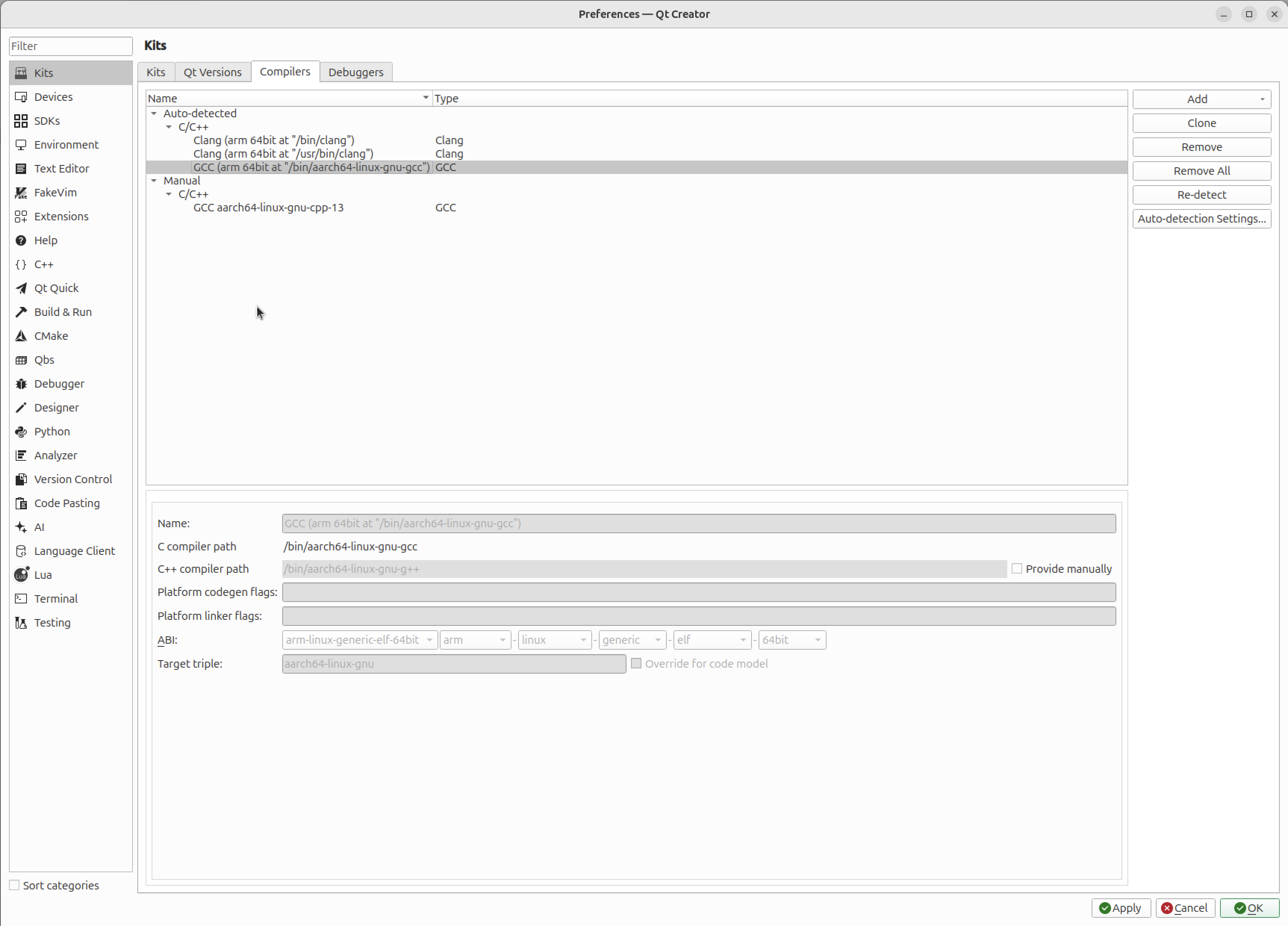
Set up Compilers
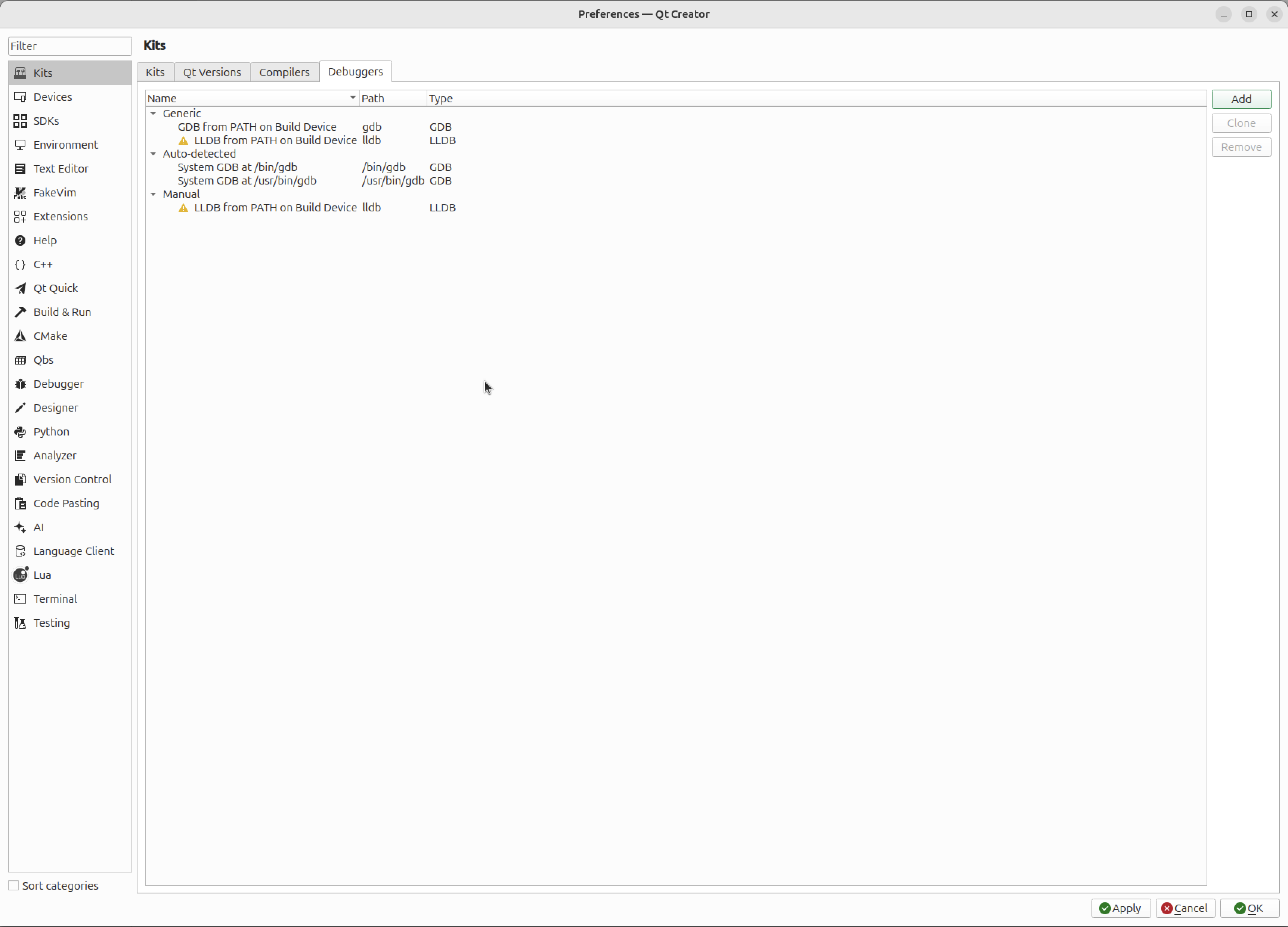
Set up Debuggers
Set up Devices
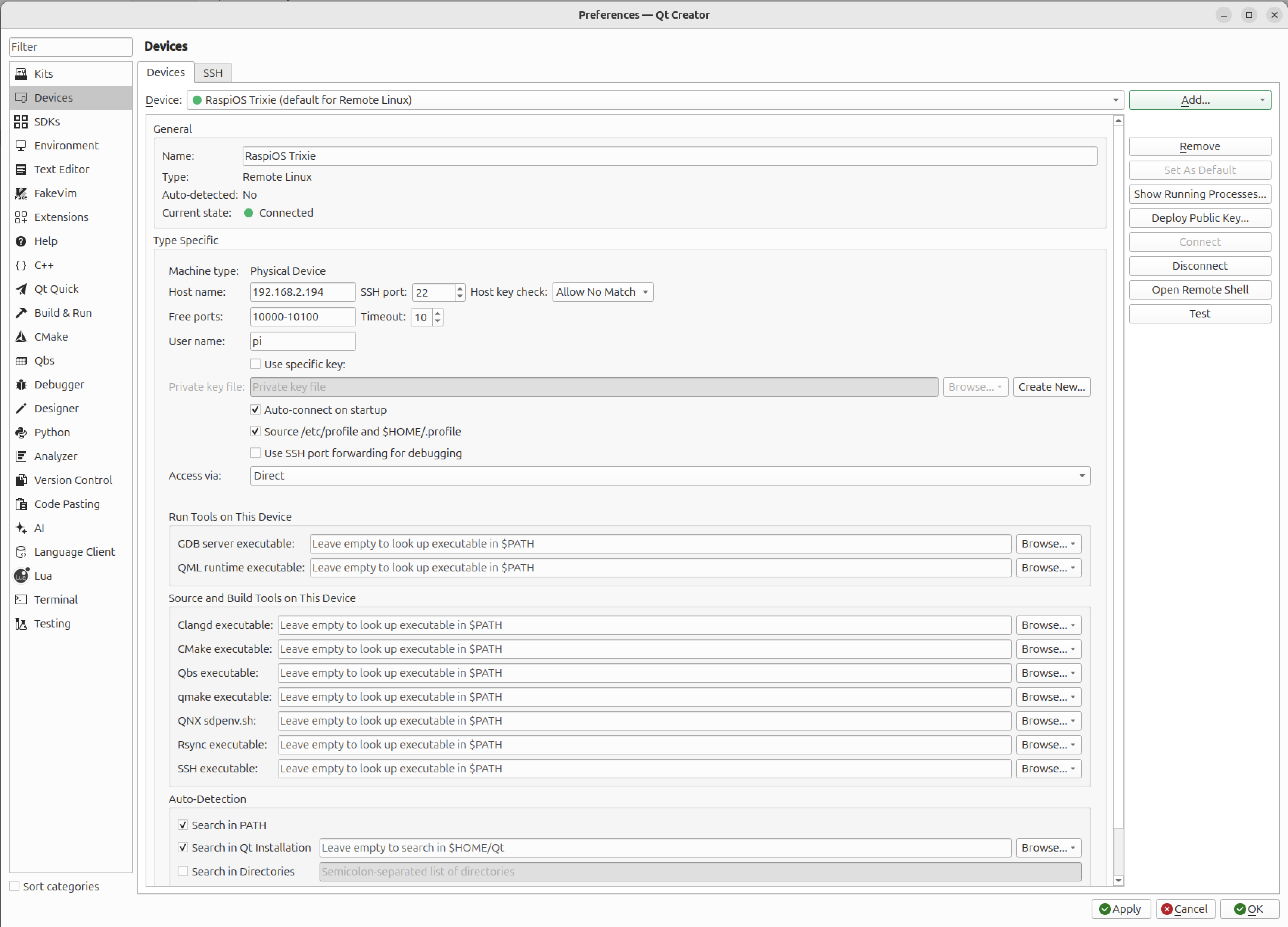
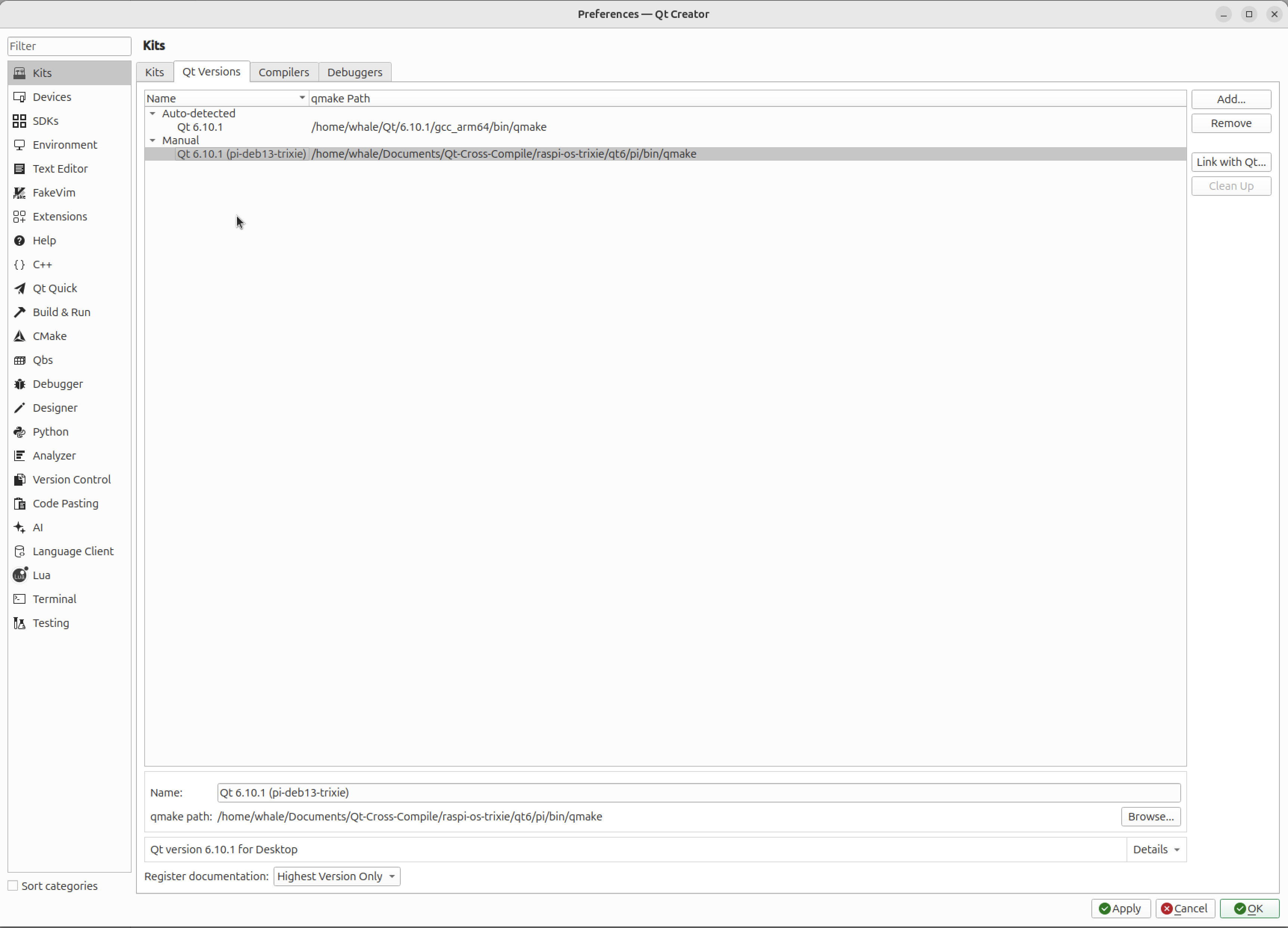
Test the connection with the button "Test"Set up Qt Versions
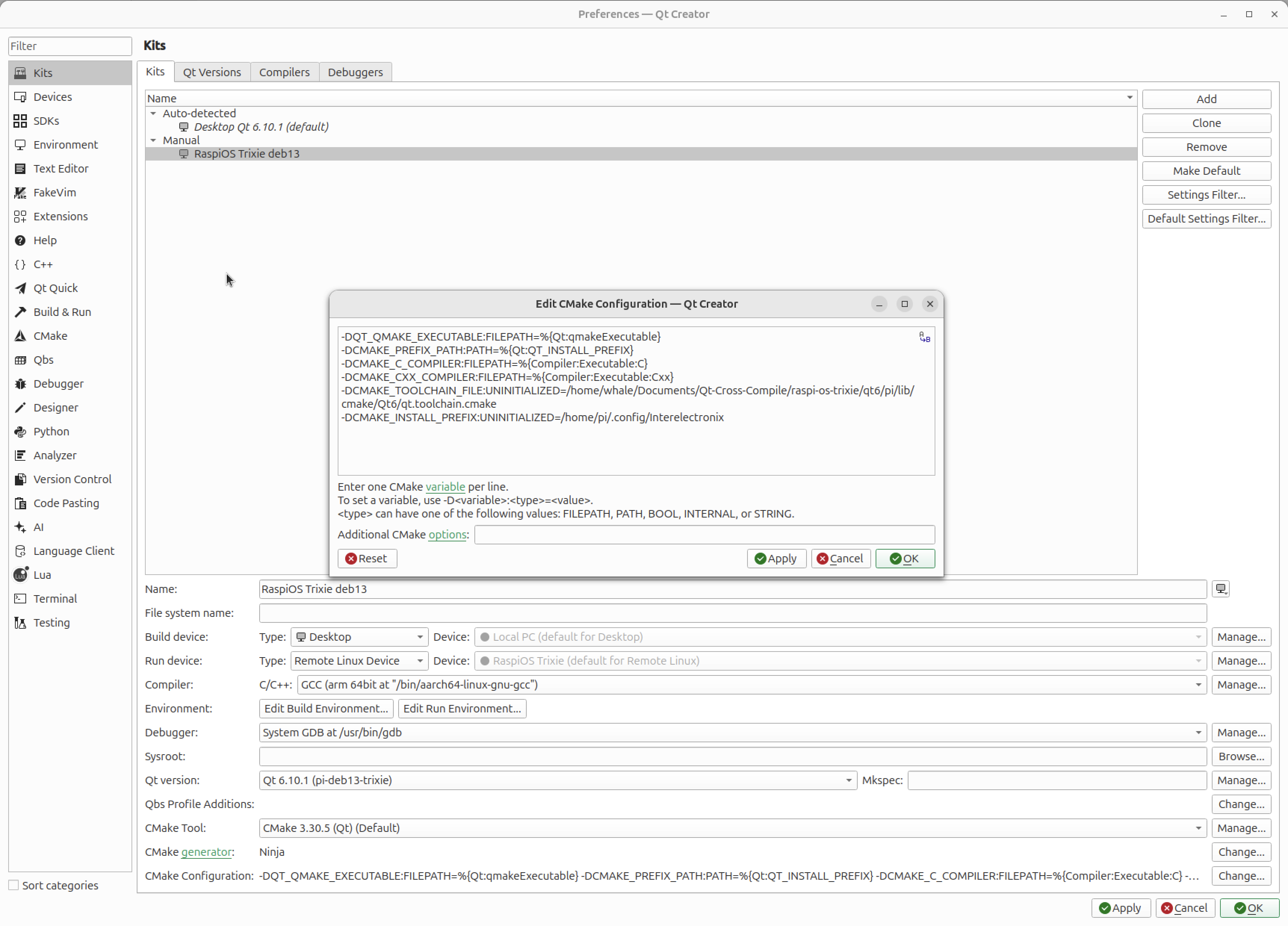
Set up Kits
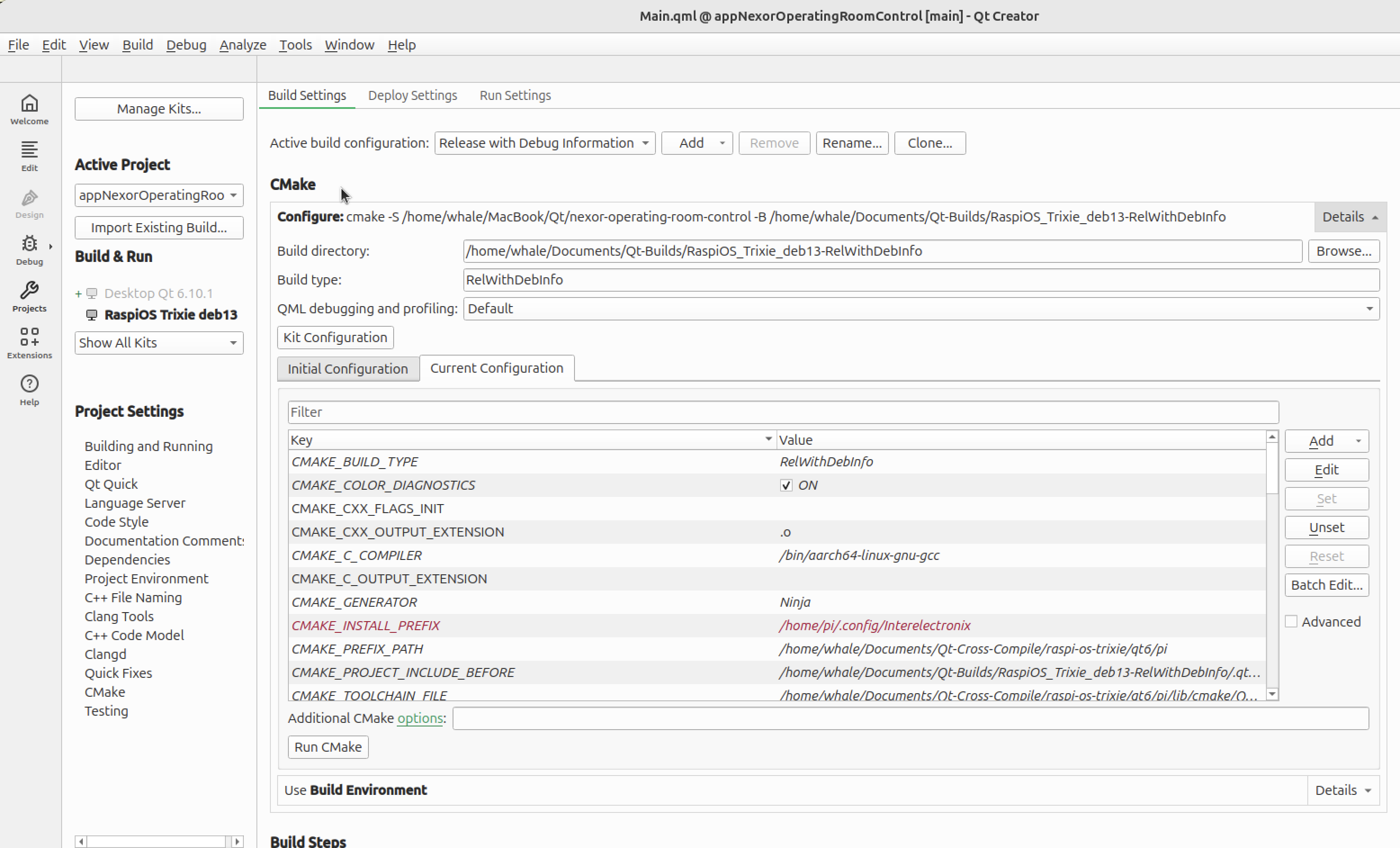
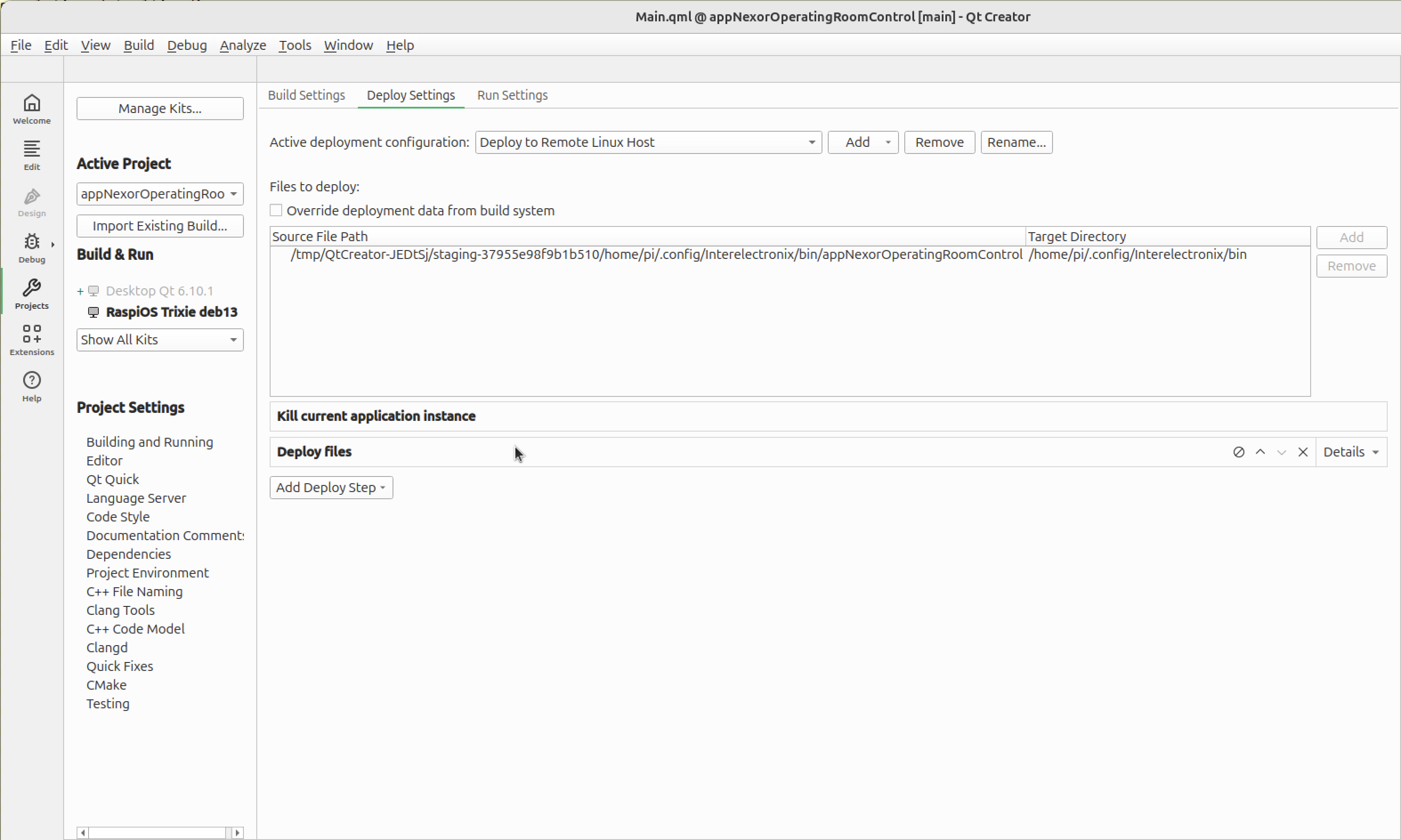
Customize build, deploy and run settings


Add Qt Submodules
- Download source codes:
cd ~/Documents/Qt-Cross-Compile/raspi-os-trixie/qt6/src
wget https://download.qt.io/official_releases/qt/6.10/6.10.1/submodules/qttools-everywhere-src-6.10.1.tar.xz
tar xf qttools-everywhere-src-6.10.1.tar.xz
mv qttools-everywhere-src-6.10.1 qttools
You have to check dependencies at /workspace/qt-rpi-cross-compilation/qt6/src/qtdeclarative-everywhere-src-6.8.0/dependencies.yaml and /workspace/qt-rpi-cross-compilation/qt6/src/qtshadertools-everywhere-src-6.8.0/dependencies.yaml.
Make sure required modules should be built and installed first.
- Build the modules for host.
cd ~/Documents/Qt-Cross-Compile/raspi-os-trixie/qt6/host-build
rm -rf *
$HOME/Documents/Qt-Cross-Compile/raspi-os-trixie/qt6/host/bin/qt-configure-module ../src/qttools
cmake --build . --parallel 8
cmake --install .- Build the modules for rpi
cd ~/Documents/Qt-Cross-Compile/raspi-os-trixie/qt6/pi-build
rm -rf *
$HOME/Documents/Qt-Cross-Compile/raspi-os-trixie/qt6/pi/bin/qt-configure-module ../src/qttools
cmake --build . --parallel 8
cmake --install .- Send the binaries to rpi.
rsync -avz --rsync-path="sudo rsync" $HOME/Documents/Qt-Cross-Compile/raspi-os-trixie/qt6/pi/* [email protected]:/usr/local/qt6Acknowledgements
Sources used to create this Instructions: