
Einführung
In einem früheren Blogposts Install Raspberry Pi OS on the Raspberry Compute Module 4 habe ich über die Installation von Raspbian auf dem Raspberry Compute Module und die Einrichtung der Cross-Kompilierung für QtCreator unter Ubuntu 20 geschrieben.
Dieser Blogpost ist ein Update auf die - zu diesem Zeitpunkt - neueste Version 6.10 von Qt, RaspiOS Trixie und Ubuntu 24.04 LTS.
In diesem Fall habe ich eine virtuelle Maschine verwendet, die mit UTM auf einem MacBook Pro M1 erstellt wurde.
Anforderungen
- Raspberry Pi Compute Module 5
- MacBook Pro M1 mit installiertem UTM
- Ubuntu 24.0.4 LTS, arm64
- Qt Version 6.10.1
- QtCreator 18
Die Installation und Einrichtung des Compute Module 5 und von Ubuntu in der UTM ist nicht Inhalt dieses Blogposts, da im Internet zahlreiche Anleitungen zu finden sind.
Einrichtung Raspberry CM5
- Flash-Image auf eMMC mit Raspberry Pi Imager
- Folgen Sie der Installation und vergessen Sie nicht die Einstellung für die Fernverbindung (ssh)
- Verbinden Sie sich mit dem RPi mit ssh -> in meinem Fall mit der IP-Adresse 192.168.2.194 und dem Benutzer pi -> von Ihrem Ubuntu-Host aus
ssh [email protected]- Installieren Sie die benötigte Software:
sudo apt-get install libboost-all-dev libudev-dev libinput-dev libts-dev libmtdev-dev libjpeg-dev libfontconfig1-dev libssl-dev libdbus-1-dev libglib2.0-dev libxkbcommon-dev libegl1-mesa-dev libgbm-dev libgles2-mesa-dev mesa-common-dev libasound2-dev libpulse-dev libgstreamer1.0-dev libgstreamer-plugins-base1.0-dev gstreamer1.0-alsa libvpx-dev libsrtp2-dev libsnappy-dev libnss3-dev "^libxcb.*" flex bison libxslt-dev ruby gperf libbz2-dev libcups2-dev libatkmm-1.6-dev libxi6 libxcomposite1 libfreetype6-dev libicu-dev libsqlite3-dev libxslt1-devsudo apt-get install libavcodec-dev libavformat-dev libswscale-dev libx11-dev freetds-dev libsqlite3-dev libpq-dev libiodbc2-dev firebird-dev libxext-dev libxcb1 libxcb1-dev libx11-xcb1 libx11-xcb-dev libxcb-keysyms1 libxcb-keysyms1-dev libxcb-image0 libxcb-image0-dev libxcb-shm0 libxcb-shm0-dev libxcb-icccm4 libxcb-icccm4-dev libxcb-sync1 libxcb-sync-dev libxcb-render-util0 libxcb-render-util0-dev libxcb-xfixes0-dev libxrender-dev libxcb-shape0-dev libxcb-randr0-dev libxcb-glx0-dev libxi-dev libdrm-dev libxcb-xinerama0 libxcb-xinerama0-dev libatspi2.0-dev libxcursor-dev libxcomposite-dev libxdamage-dev libxss-dev libxtst-dev libpci-dev libcap-dev libxrandr-dev libdirectfb-dev libaudio-dev libxkbcommon-x11-dev gdbserver- Erstellen Sie einen Ordner für die Installation von Qt 6:
sudo mkdir /usr/local/qt6- Fügen Sie den folgenden Code an das Ende von ~/.bashrc an und aktualisieren Sie die Änderungen:
export LD_LIBRARY_PATH=$LD_LIBRARY_PATH:/usr/local/qt6/lib/
source ~/.bashrc
Ubuntu 24.04 LTS einrichten
- Aktualisieren Sie auf die neuesten Versionen der Softwarepakete:
sudo apt update
sudo apt upgrade- Installieren Sie die folgenden Pakete:
sudo apt-get install make cmake build-essential libclang-dev clang ninja-build gcc git bison python3 gperf pkg-config libfontconfig1-dev libfreetype6-dev libx11-dev libx11-xcb-dev libxext-dev libxfixes-dev libxi-dev libxrender-dev libxcb1-dev libxcb-glx0-dev libxcb-keysyms1-dev libxcb-image0-dev libxcb-shm0-dev libxcb-icccm4-dev libxcb-sync-dev libxcb-xfixes0-dev libxcb-shape0-dev libxcb-randr0-dev libxcb-render-util0-dev libxcb-util-dev libxcb-xinerama0-dev libxcb-xkb-dev libxkbcommon-dev libxkbcommon-x11-dev libatspi2.0-dev libgl1-mesa-dev libglu1-mesa-dev freeglut3-dev python3-html5lib libxcb-dri3-dev libxkbfile-dev libxshmfence-dev libxrandr-dev libxcursor-dev libxcomposite-dev libdrm-dev libwayland-devQt6 bauen
Es gibt zwei Möglichkeiten, Qt6 zu bauen. Es gibt eine "single" (https://download.qt.io/official_releases/qt/6.10/6.10.1/single/qt-everywhere-src-6.10.1.tar.xz) Version zum Herunterladen, die qtbase und alle Untermodule enthält. Diese Version ist sehr umfangreich und benötigt viel Energie und Zeit, um sie zu kompilieren.
Ich empfehle Ihnen, qtbase als Basis zu kompilieren und anschließend nur jedes Submodul, das Sie benötigen, separat zu kompilieren.
- Erstellen Sie Ordner für sysroot und qt6. Ich erstelle diese Ordner in meinem Verzeichnis Dokumente/Cross-Compile/raspi-os-trixie.
mkdir ~/Documents/Qt-Cross-Compile ~/Documents/Qt-Cross-Compile/raspi-os-trixie
cd ~/Documents/Qt-Cross-Compile/raspi-os-trixie
mkdir rpi-sysroot rpi-sysroot/usr rpi-sysroot/opt
mkdir qt6 qt6/host qt6/pi qt6/host-build qt6/pi-build qt6/src- QtBase Quellcode herunterladen
cd ~/Documents/Qt-Cross-Compile/raspi-os-trixie/qt6/src
wget https://download.qt.io/official_releases/qt/6.10/6.10.1/submodules/qtbase-everywhere-src-6.10.1.tar.xz
tar xf qtbase-everywhere-src-6.10.1.tar.xz- Benennen Sie qtbase-everywhere-src-6.10.1 in qtbase um, da qttranslations nicht mit qtbase-everywhere-src-6.10.1 funktionieren kann
mv qtbase-everywhere-src-6.10.1 qtbaseBauen Sie Qt6 für den Host
cd ~/Documents/Qt-Cross-Compile/raspi-os-trixie/qt6/host-build

cmake ../src/qtbase/ -GNinja -DCMAKE_BUILD_TYPE=Release -DQT_BUILD_EXAMPLES=OFF -DQT_BUILD_TESTS=OFF -DCMAKE_INSTALL_PREFIX=$HOME/Documents/Qt-Cross-Compile/raspi-os-trixie/qt6/host

cmake --build . --parallel 8
cmake --install .
Die Binärdateien befinden sich dann in ~/Documents/Qt-Cross-Compile/raspi-os-trixie/qt6/host
Qt6 für rpi erstellen
Kopieren Sie ein paar Ordner von rpi und fügen Sie sie mit rsync über SSH ein.
cd ~/Documents/Qt-Cross-Compile/raspi-os-trixie
rsync -avzS --rsync-path="rsync" --delete [email protected]:/lib/* ~/Documents/Qt-Cross-Compile/raspi-os-trixie/rpi-sysroot/lib
rsync -avzS --rsync-path="rsync" --delete [email protected]:/usr/include/* ~/Documents/Qt-Cross-Compile/raspi-os-trixie/rpi-sysroot/usr/include
rsync -avzS --rsync-path="rsync" --delete [email protected]:/usr/lib/* ~/Documents/Qt-Cross-Compile/raspi-os-trixie/rpi-sysroot/usr/lib
rsync -avzS --rsync-path="rsync" --delete [email protected]:/opt/vc ~/Documents/Qt-Cross-Compile/raspi-os-trixie/rpi-sysroot/opt/vc- Erstellen Sie eine Datei namens toolchain.cmake in ~/Documents/Qt-Cross-Compile/raspi-os-trixie.
Sie müssen die Zeile "set(TARGET_SYSROOT ~/Documents/Qt-Cross-Compile/raspi-os-trixie/rpi-sysroot)" an Ihre Umgebung anpassen.
cmake_minimum_required(VERSION 3.18)
include_guard(GLOBAL)

set(CMAKE_SYSTEM_NAME Linux)
set(CMAKE_SYSTEM_PROCESSOR arm)

set(TARGET_SYSROOT /home/whale/Documents/Qt-Cross-Compile/raspi-os-trixie/rpi-sysroot)
set(CMAKE_SYSROOT ${TARGET_SYSROOT})

set(ENV{PKG_CONFIG_PATH} $PKG_CONFIG_PATH:/usr/lib/aarch64-linux-gnu/pkgconfig)
set(ENV{PKG_CONFIG_LIBDIR} /usr/lib/pkgconfig:/usr/share/pkgconfig/:${TARGET_SYSROOT}/usr/lib/aarch64-linux-gnu/pkgconfig:${TARGET_SYSROOT}/usr/lib/pkgconfig)
set(ENV{PKG_CONFIG_SYSROOT_DIR} ${CMAKE_SYSROOT})

# if you use other version of gcc and g++ than gcc/g++ 9, you must change the following variables
set(CMAKE_C_COMPILER /usr/bin/aarch64-linux-gnu-gcc-13)
set(CMAKE_CXX_COMPILER /usr/bin/aarch64-linux-gnu-g++-13)

set(CMAKE_C_FLAGS "${CMAKE_C_FLAGS} -I${TARGET_SYSROOT}/usr/include")
set(CMAKE_CXX_FLAGS "${CMAKE_C_FLAGS}")

set(QT_COMPILER_FLAGS "-march=armv8-a")
set(QT_COMPILER_FLAGS_RELEASE "-O2 -pipe -DNDEBUG")
set(QT_LINKER_FLAGS "-Wl,-O1 -Wl,--hash-style=gnu -Wl,--as-needed")

set(CMAKE_FIND_ROOT_PATH_MODE_PROGRAM NEVER)
set(CMAKE_FIND_ROOT_PATH_MODE_LIBRARY ONLY)
set(CMAKE_FIND_ROOT_PATH_MODE_INCLUDE ONLY)
set(CMAKE_FIND_ROOT_PATH_MODE_PACKAGE ONLY)
set(CMAKE_INSTALL_RPATH_USE_LINK_PATH TRUE)
set(CMAKE_BUILD_RPATH ${TARGET_SYSROOT})


include(CMakeInitializeConfigs)

function(cmake_initialize_per_config_variable _PREFIX _DOCSTRING)
  if (_PREFIX MATCHES "CMAKE_(C|CXX|ASM)_FLAGS")
    set(CMAKE_${CMAKE_MATCH_1}_FLAGS_INIT "${QT_COMPILER_FLAGS}")

    foreach (config DEBUG RELEASE MINSIZEREL RELWITHDEBINFO)
      if (DEFINED QT_COMPILER_FLAGS_${config})
        set(CMAKE_${CMAKE_MATCH_1}_FLAGS_${config}_INIT "${QT_COMPILER_FLAGS_${config}}")
      endif()
    endforeach()
  endif()


  if (_PREFIX MATCHES "CMAKE_(SHARED|MODULE|EXE)_LINKER_FLAGS")
    foreach (config SHARED MODULE EXE)
      set(CMAKE_${config}_LINKER_FLAGS_INIT "${QT_LINKER_FLAGS}")
    endforeach()
  endif()

  _cmake_initialize_per_config_variable(${ARGV})
endfunction()

set(XCB_PATH_VARIABLE ${TARGET_SYSROOT})

set(GL_INC_DIR ${TARGET_SYSROOT}/usr/include)
set(GL_LIB_DIR ${TARGET_SYSROOT}:${TARGET_SYSROOT}/usr/lib/aarch64-linux-gnu/:${TARGET_SYSROOT}/usr:${TARGET_SYSROOT}/usr/lib)

set(EGL_INCLUDE_DIR ${GL_INC_DIR})
set(EGL_LIBRARY ${XCB_PATH_VARIABLE}/usr/lib/aarch64-linux-gnu/libEGL.so)

set(OPENGL_INCLUDE_DIR ${GL_INC_DIR})
set(OPENGL_opengl_LIBRARY ${XCB_PATH_VARIABLE}/usr/lib/aarch64-linux-gnu/libOpenGL.so)

set(GLESv2_INCLUDE_DIR ${GL_INC_DIR})
set(GLESv2_LIBRARY ${XCB_PATH_VARIABLE}/usr/lib/aarch64-linux-gnu/libGLESv2.so)

set(gbm_INCLUDE_DIR ${GL_INC_DIR})
set(gbm_LIBRARY ${XCB_PATH_VARIABLE}/usr/lib/aarch64-linux-gnu/libgbm.so)

set(Libdrm_INCLUDE_DIR ${GL_INC_DIR})
set(Libdrm_LIBRARY ${XCB_PATH_VARIABLE}/usr/lib/aarch64-linux-gnu/libdrm.so)

set(XCB_XCB_INCLUDE_DIR ${GL_INC_DIR})
set(XCB_XCB_LIBRARY ${XCB_PATH_VARIABLE}/usr/lib/aarch64-linux-gnu/libxcb.so)- Absolute symbolische Links korrigieren
sudo apt install symlinks
cd ~/Documents/Qt-Cross-Compile/raspi-os-trixie
symlinks -rc rpi-sysroot- Kompilieren Sie den Quellcode für rpi.
cd ~/Documents/Qt-Cross-Compile/raspi-os-trixie/qt6/pi-build

cmake ../src/qtbase/ -GNinja -DCMAKE_BUILD_TYPE=Release -DINPUT_opengl=es2 -DQT_BUILD_EXAMPLES=OFF -DQT_BUILD_TESTS=OFF -DQT_HOST_PATH=$HOME/Documents/Qt-Cross-Compile/raspi-os-trixie/qt6/host -DCMAKE_STAGING_PREFIX=$HOME/Documents/Qt-Cross-Compile/raspi-os-trixie/qt6/pi -DCMAKE_INSTALL_PREFIX=/usr/local/qt6 -DCMAKE_TOOLCHAIN_FILE=$HOME/Documents/Qt-Cross-Compile/raspi-os-trixie/toolchain.cmake -DQT_QMAKE_TARGET_MKSPEC=devices/linux-rasp-pi4-aarch64 -DQT_FEATURE_wayland=ON

cmake --build . --parallel 8
cmake --install .- Senden Sie die Binärdateien an rpi.
rsync -avz --rsync-path="sudo rsync" $HOME/Documents/Qt-Cross-Compile/raspi-os-trixie/qt6/pi/* [email protected]:/usr/local/qt6QtCreator konfigurieren
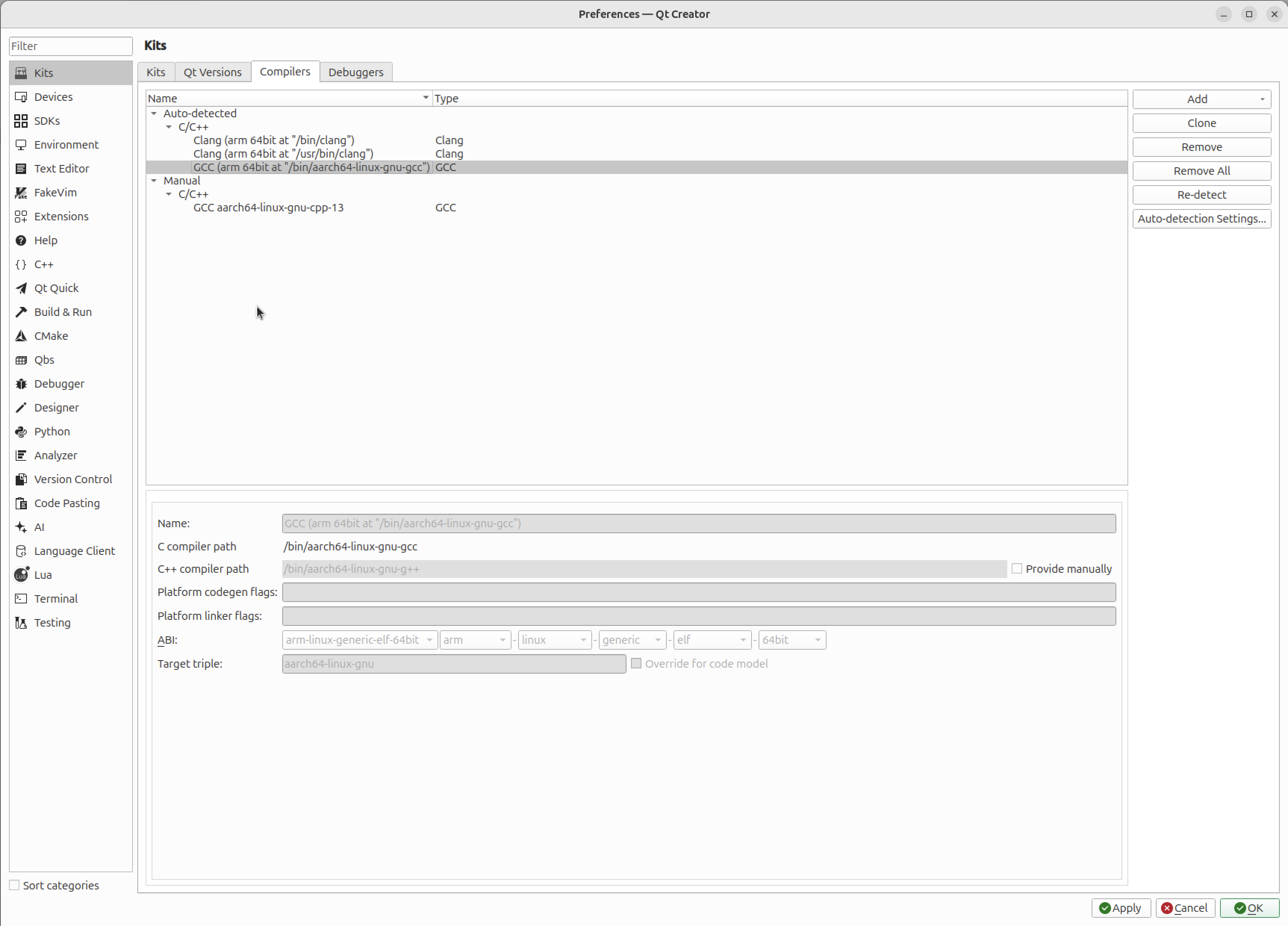
Compiler einrichten
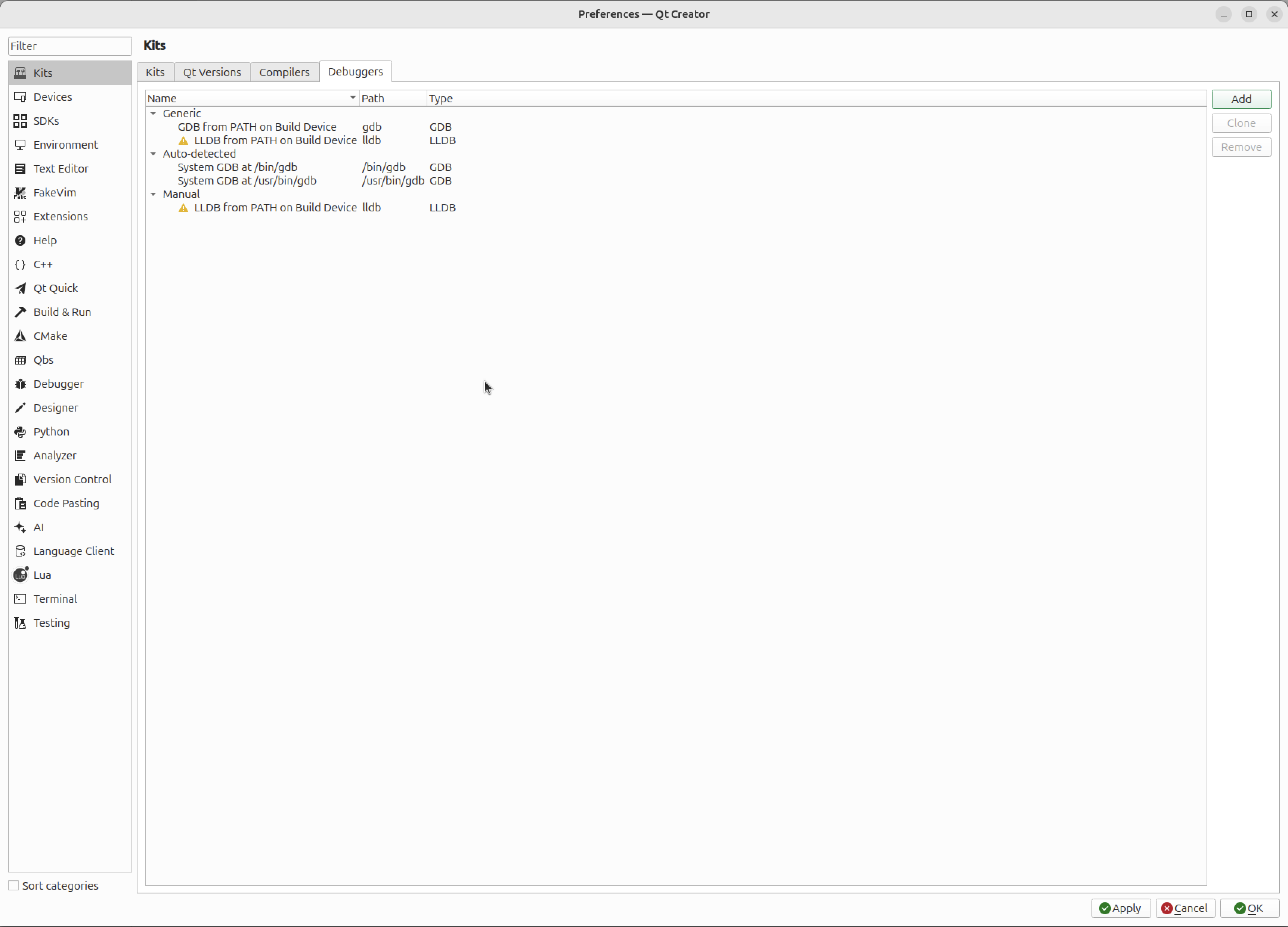
Set up Debuggers
Set up Devices
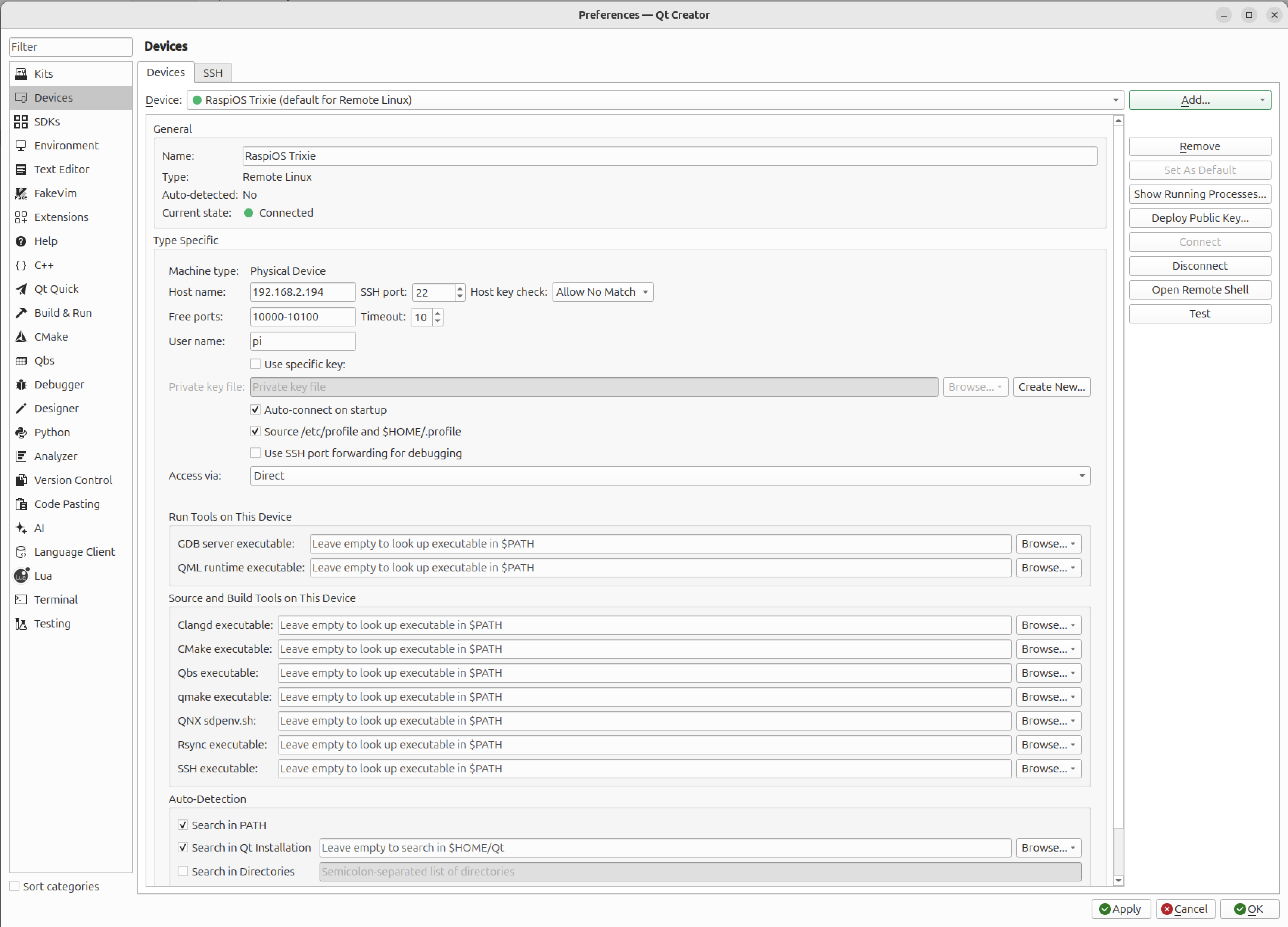
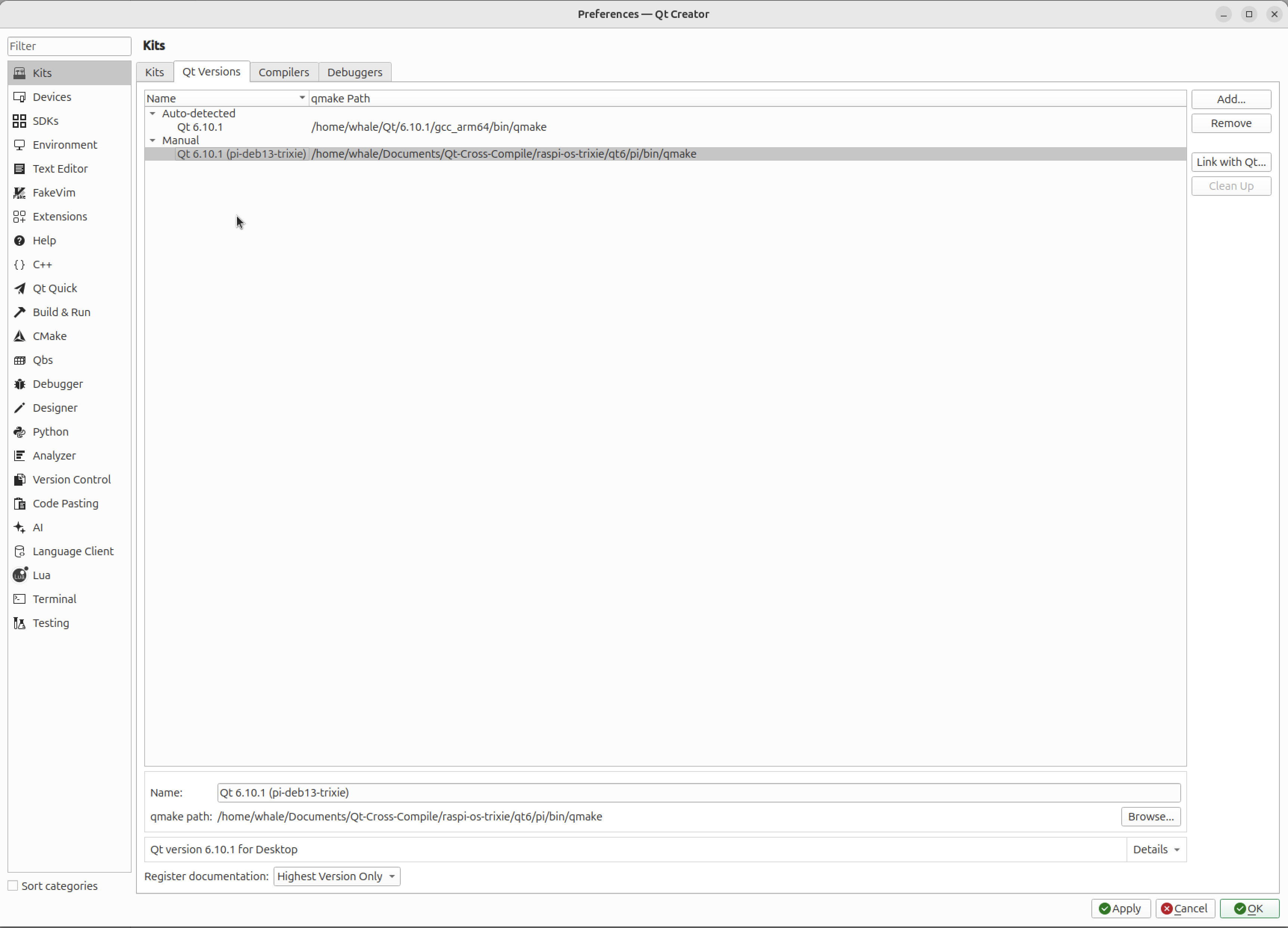
Test the connection with the button "Test"Set up Qt Versions
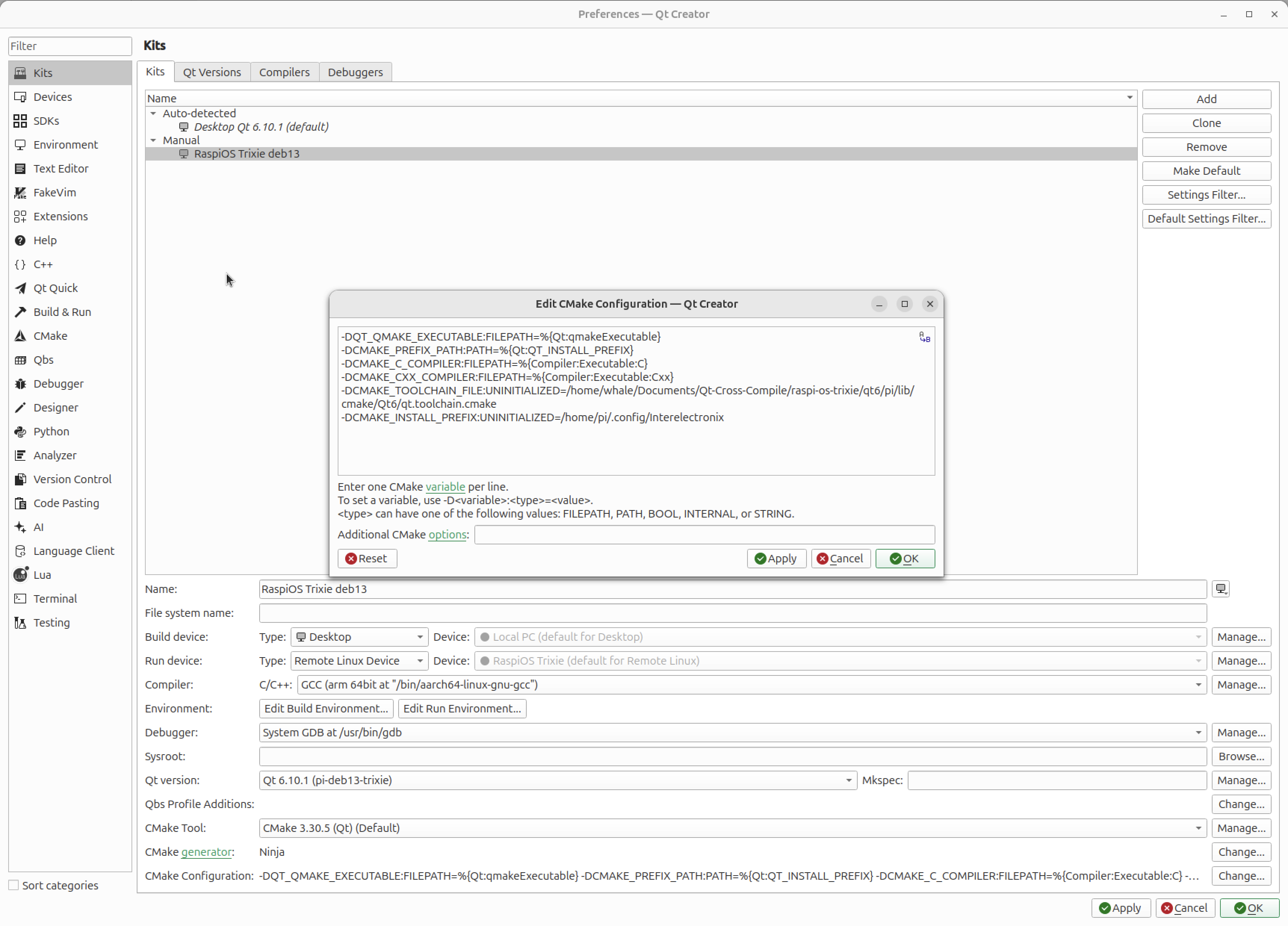
Set up Kits
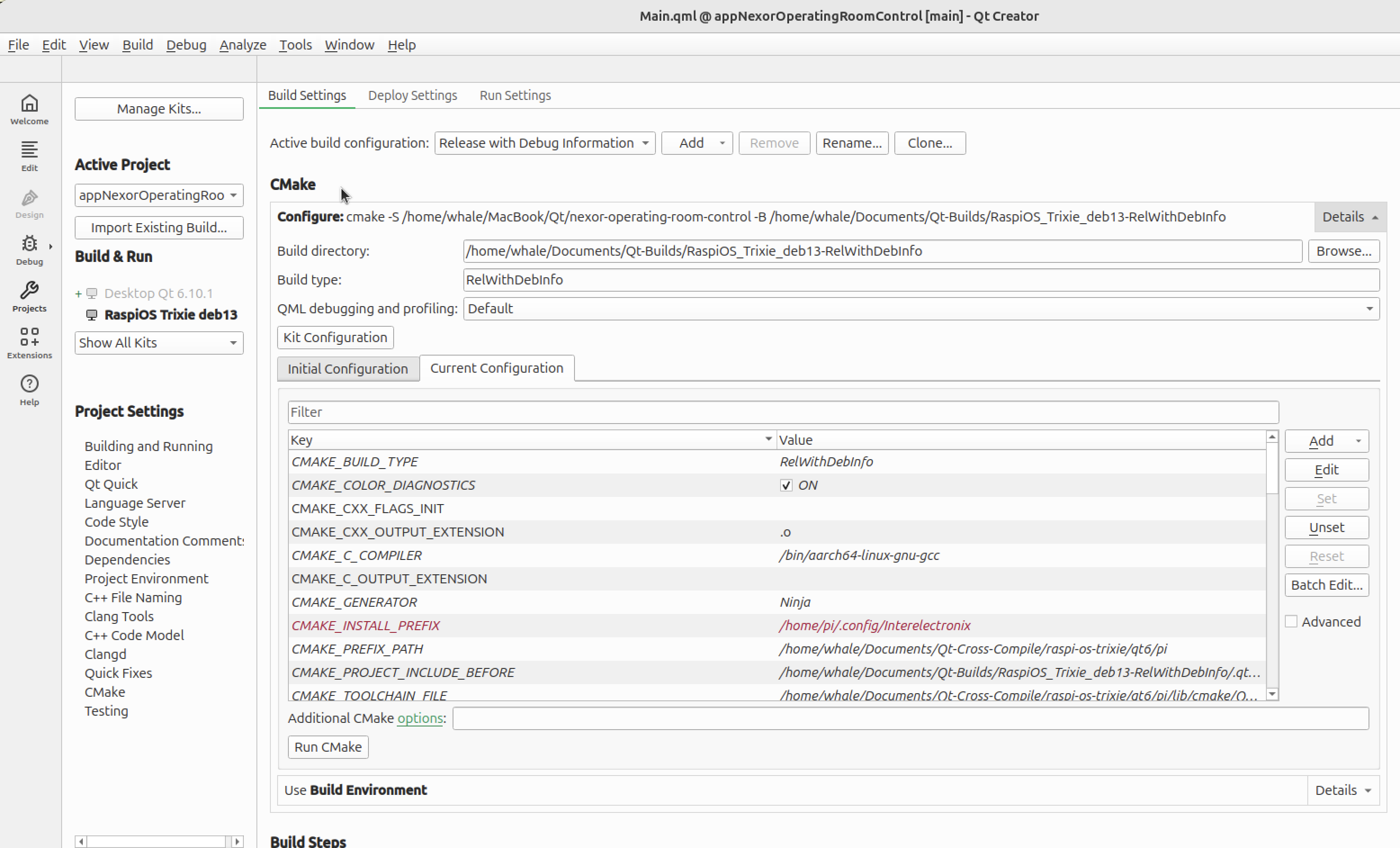
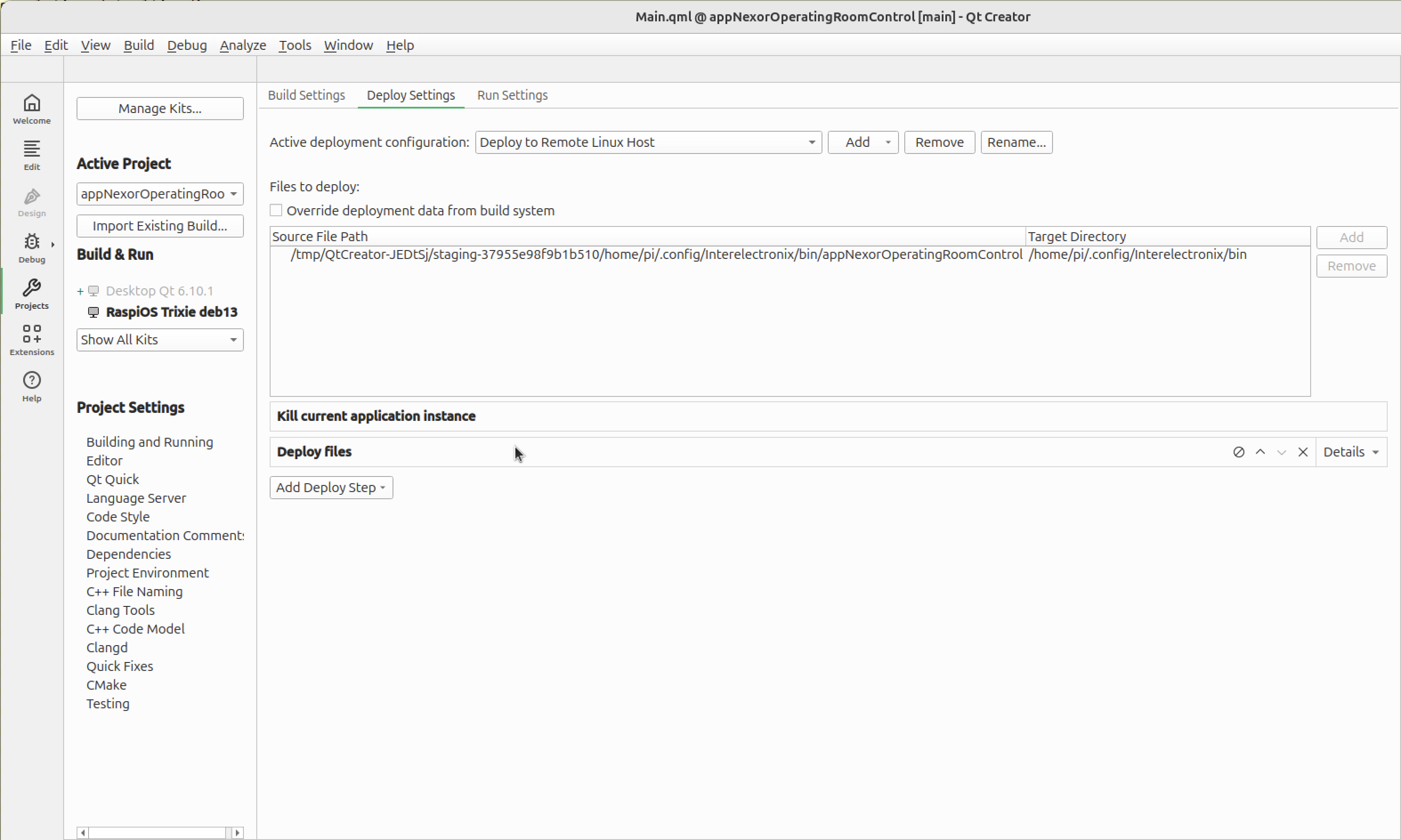
Customize build, deploy and run settings


Qt Submodule hinzufügen
- Quellcodes herunterladen:
cd ~/Documents/Qt-Cross-Compile/raspi-os-trixie/qt6/src
wget https://download.qt.io/official_releases/qt/6.10/6.10.1/submodules/qttools-everywhere-src-6.10.1.tar.xz
tar xf qttools-everywhere-src-6.10.1.tar.xz
mv qttools-everywhere-src-6.10.1 qttools
Sie müssen die Abhängigkeiten unter /workspace/qt-rpi-cross-compilation/qt6/src/qtdeclarative-everywhere-src-6.8.0/dependencies.yaml und /workspace/qt-rpi-cross-compilation/qt6/src/qtshadertools-everywhere-src-6.8.0/dependencies.yaml überprüfen.
Vergewissern Sie sich, dass die benötigten Module zuerst gebaut und installiert werden.
- Bauen Sie die Module für den Host.
cd ~/Documents/Qt-Cross-Compile/raspi-os-trixie/qt6/host-build
rm -rf *
$HOME/Documents/Qt-Cross-Compile/raspi-os-trixie/qt6/host/bin/qt-configure-module ../src/qttools
cmake --build . --parallel 8
cmake --install .- Bauen Sie die Module für rpi
cd ~/Documents/Qt-Cross-Compile/raspi-os-trixie/qt6/pi-build
rm -rf *
$HOME/Documents/Qt-Cross-Compile/raspi-os-trixie/qt6/pi/bin/qt-configure-module ../src/qttools
cmake --build . --parallel 8
cmake --install .- Senden Sie die Binärdateien an rpi.
rsync -avz --rsync-path="sudo rsync" $HOME/Documents/Qt-Cross-Compile/raspi-os-trixie/qt6/pi/* [email protected]:/usr/local/qt6Danksagung
Quellen, die zur Erstellung dieser Anleitung verwendet wurden: